From Unit Overview to classroom-ready lessons
The ViVEDUS Planner serves as an advanced lesson planning tool that builds upon your Unit Overview. Every lesson you create provides a detailed roadmap for implementing your unit to meet the specific needs of the learners in your class. Think of it as translating your big-picture curriculum planning into actionable, day-by-day teaching.
Step-by-Step: Creating your lesson
Step 1: Start a new lesson
From your ViVEDUS dashboard, simply click the "Create New Lesson" button.
Step 2: Select your Unit Overview
Choose which Unit Overview you're planning a lesson for. This ensures everything you create stays connected to your broader teaching plan.
Step 3: Choose your pieces
The Planner guides you through selecting the specific elements from your Unit Overview that you'd like to use in this lesson. This process guarantees your lesson is perfectly aligned to both your Unit Overview and the curriculum objectives you're teaching.
Building on the Five Phases of Learning
You'll see a screen displaying the Five Phases of Learning (Possibility Thinking) that you created in your Unit Overview.
Select your phase
Choose which Phase of Learning activity you'd like to base your lesson on, then click "Next".
Choose your provocation
The Possibility Thinking activity you selected has several provocations, dispositions, and objectives (learning intentions) attached to it. Select the provocation you want to build your lesson around, then click "Next."
Pick your challenge
Each Possibility Card includes an open-ended challenge. Select which challenge you'd like to use for this lesson.
Define your dispositions
Finally, choose which characteristics of your focus disposition(s) you'd like to embed into your lesson. You can select one or multiple characteristics.
Note: Each disposition is defined by three characteristics, creating a common understanding across your school of what terms like "Curious" or "Experimental" actually mean in practice.
Your lesson foundation is ready
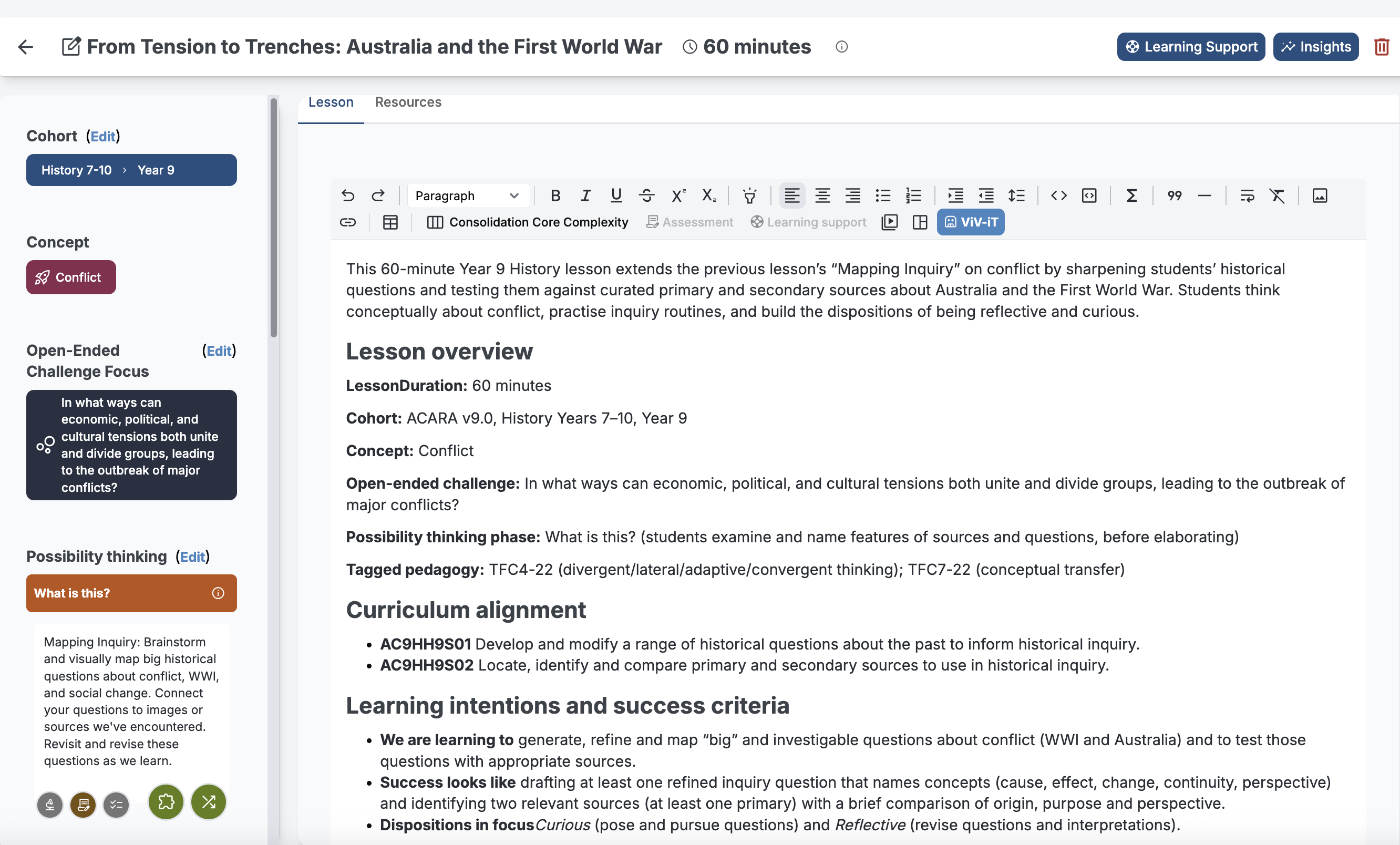
Once you've selected all your pieces, you're ready to plan your lesson. On the lesson planning screen, you'll see all those elements displayed in the scroll bar on the left side of the window—your learning intentions, provocations, challenges, and dispositions all in one view.
The power of ViV-iT: AI-generated lessons
Here's the exciting part: by selecting those pieces from your Unit Overview, you've created all the prompts ViV-iT needs to generate a complete lesson for you.
Generate your lesson
Simply click the blue ViV-iT button and give it an instruction, such as:
- "Generate a 60-minute lesson for me"
- "Create a lesson for hands-on learning"
- "Create a lesson with scaffolded reading materials using this text..."
Beyond the lesson plan
ViV-iT can:
- generate lessons using specific resources you specify
- generate accompanying teaching resources (worksheets, discussion prompts, group activities, etc.)
- design homework activities
- generate a lesson summary to post to students who were absent.
The critical difference: Curriculum alignment
Because ViV-iT draws exclusively from the pieces of your Unit Overview you've selected, you can be confident that what it generates is aligned with what you're meant to be teaching. It's not pulling random ideas from the internet—it's working within the curriculum framework you've already defined.
Built-in differentiation for every learner
One of ViV-iT's most powerful features is its ability to automatically provide differentiation activities that support the individual learning needs in your class. Whether you're supporting students who need extension, scaffolding, or alternative approaches, ViV-iT builds these variations into the lesson plan without requiring separate planning time.
Can I still use my resources like textbooks?
Yes, you can still design a lesson manually using the WYSIWYG tools. You can reference a textbook you are using, or the particular program you are implementing. The beauty of the Vivedus Planner is that you have a record of the lessons you have taught.
The complete picture: From vision to classroom practice
The ViVEDUS lesson planning process creates a seamless connection between your curriculum obligations, your unit planning, and what actually happens in your classroom each day. Every lesson is curriculum-aligned, pedagogically sound, and differentiated for the diverse learners you teach—all created in a fraction of the time traditional planning requires and at a Highly Accomplished teacher standard.